emWin(ucGUI)在PC机上模拟的按键响应多次解决办法

emWin(ucgui) 在PC端的模拟器,默认的按键机制是"按抬都发送Msg",当在按下键盘时,会收到一个key值-1,在按键没有离开时一直维持,当按键松开时还发送一个key值-0的标记。所以在你手速多快的情况下都会有一个 key,1和key,0两个操作。程序中没有对按键的状态做判定,所以在PC上不管是按下,还是按下后离开都会进行响应(两次响应)。

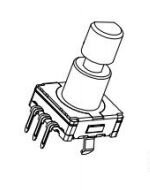
STM32读取旋钮编码器

主要代码

 1
 2
 3
 4
 5
 6
 7
 8
 9
10
11
12
13
14
15
16
17
18
19
20
21
22
23
24
25
26
27
28
#define ROTATE_A  PAin(2)
#define ROTATE_B PAin(3)
s16 DATA=0;
//中断处理
void EXTI2_IRQHandler(void)
{
  if(EXTI_GetITStatus(EXTI_Line2) != RESET)
  {
    if(ROTATE_A!=ROTATE_B)
     {
        DATA++;
     }
        else DATA--;
    EXTI_ClearITPendingBit(EXTI_Line2);
  }
}

void main(void)
{
          SystemInit();
          delay_init(72);
          NVIC_Configuration();
          KEY_Init();
   while(1)
  {
       ;
  }
}

自定义的小型调试器,类似于printf(基于emwin),通过屏幕显示

自定义的小型调试器,类似于printf(基于emwin),通过屏幕显示

可供外部使用的函数有

1
2
3
Hide_Debug()
Show_Debug()
GUI_Printf(const char*,)

程序代码

  1
  2
  3
  4
  5
  6
  7
  8
  9
 10
 11
 12
 13
 14
 15
 16
 17
 18
 19
 20
 21
 22
 23
 24
 25
 26
 27
 28
 29
 30
 31
 32
 33
 34
 35
 36
 37
 38
 39
 40
 41
 42
 43
 44
 45
 46
 47
 48
 49
 50
 51
 52
 53
 54
 55
 56
 57
 58
 59
 60
 61
 62
 63
 64
 65
 66
 67
 68
 69
 70
 71
 72
 73
 74
 75
 76
 77
 78
 79
 80
 81
 82
 83
 84
 85
 86
 87
 88
 89
 90
 91
 92
 93
 94
 95
 96
 97
 98
 99
100
101
102
103
104
105
106
107
108
109
110
111
#include <stdarg.h>
#include <string.h>
#include <stdint.h>
#include <stdbool.h>
#include <stdio.h>
#include "GUI.h"
#include "WM.h"
//需要中文字库的支持才可以打印中文信息
//仅需要在需要调试信息的部分调用GUI_Printf(const char* fmt,...)进行显示
//与printf的用法一致
//通过调用Show_debug()创建调试窗口
//通过调用Hide_debug()删除窗口
#define MAX_BUF         1024*4
#define ID_FRAMEWIN_0 (GUI_ID_USER+0)
#define ID_MULTIEDIT_0 (GUI_ID_USER+1)
static WM_HWIN error_hwin;
static WM_HTIMER hTimer;
static char debug_infomation[MAX_BUF];
struct __Debug_Ctrl
{
    const uint32_t DEBUG_MAX_BUF;
    char* const Debug_Buffer;
    bool fresh_flag;
}Debug_Ctrl;
struct __Debug_Ctrl Debug_Ctrl=
{
    .DEBUG_MAX_BUF=MAX_BUF,
    .Debug_Buffer=debug_infomation,
    .fresh_flag=false
};
static const GUI_WIDGET_CREATE_INFO _aDialogCreate[] = {
  { FRAMEWIN_CreateIndirect, "Framewin", ID_FRAMEWIN_0, 0, 300, 300, 300, 0, 0x0, 0 },
  { MULTIEDIT_CreateIndirect, "Multipage", ID_MULTIEDIT_0, 0, 0, 290, 280, 0, 0x0, 0 },
  // USER START (Optionally insert additional widgets)
  // USER END
};
static void _cbDialog(WM_MESSAGE * pMsg) 
{
    WM_HWIN hItem;
    switch (pMsg->MsgId) 
    {
        case WM_PRE_PAINT:
            GUI_MULTIBUF_Begin();
            break;
        case WM_POST_PAINT:
            GUI_MULTIBUF_End();
            break;
        case WM_INIT_DIALOG:
            //
            // Initialization of 'Framewin'
            //
            hItem = pMsg->hWin;
            FRAMEWIN_SetFont(hItem, &GUI_FontHZ16);
            FRAMEWIN_SetText(hItem,"调试信息");
            //
            // Initialization of 'Multipage'
            //
            hItem = WM_GetDialogItem(pMsg->hWin, ID_MULTIEDIT_0);
            MULTIEDIT_SetFont(hItem, &GUI_FontHZ16);
            MULTIEDIT_SetAutoScrollV(hItem,1);
            MULTIEDIT_SetAutoScrollH(hItem,1);
            MULTIEDIT_SetMaxNumChars(hItem,Debug_Ctrl.DEBUG_MAX_BUF);
            MULTIEDIT_SetBufferSize(hItem,Debug_Ctrl.DEBUG_MAX_BUF);
            MULTIEDIT_SetText(hItem,Debug_Ctrl.Debug_Buffer);
            MULTIEDIT_SetFocussable(hItem,0);
            break;
        case WM_NOTIFY_PARENT:
            break;
        case WM_TIMER:
            if(Debug_Ctrl.fresh_flag==true)
            {
                hItem = WM_GetDialogItem(pMsg->hWin, ID_MULTIEDIT_0);
                MULTIEDIT_SetText(hItem,Debug_Ctrl.Debug_Buffer);
                Debug_Ctrl.fresh_flag=false;
            }
            WM_RestartTimer(hTimer,200);
            break;
        default:
            WM_DefaultProc(pMsg);
            break;
    }
}
void Hide_debug(void)
{
    WM_DeleteWindow(error_hwin);
}
void Show_debug(void)
{
    WM_HWIN hwin;
    error_hwin=GUI_CreateDialogBox(_aDialogCreate, GUI_COUNTOF(_aDialogCreate), _cbDialog, WM_HBKWIN, 0, 0);

    WM_SetStayOnTop(error_hwin,1);
    hwin=WM_GetClientWindow(error_hwin);
    hTimer=WM_CreateTimer(hwin,0,200,0);
}
void GUI_Printf(const char* fmt,...)
{
    static uint16_t Debug_num=0;
    va_list args;
    if(Debug_Ctrl.DEBUG_MAX_BUF-Debug_num<64)//预留出64字节的缓冲区,因此单次使用GUI_Printf不能超过64个字节
    {
        memset(Debug_Ctrl.Debug_Buffer,'\0',Debug_Ctrl.DEBUG_MAX_BUF);
        Debug_num=0;
    }
    va_start(args,fmt);                                 //取出可变参数
    Debug_num+=vsprintf(&Debug_Ctrl.Debug_Buffer[Debug_num],fmt,args);
    va_end(args);                                       //恢复堆栈的数据
    Debug_Ctrl.Debug_Buffer[Debug_num]='\n';          //向末尾添加换行符
    Debug_num++;
    Debug_Ctrl.fresh_flag=true;
}

CC65 开发FC/NES 游戏(二)Hello world

记事本编辑文件 helloworld.c

Helloworld.c代码

1
2
3
4
5
6
#include <conio.h>
void main()
{
    cprintf("Hello World!");
    while(1){}
}

备注:正常的C语音使用的是 printf 但是CC65使用的是 cprintf 用来在屏幕显示字符串
while是为了让程序进入死循环不会退出,如果你想看看没有最后的死循环是啥样的我只能提前告诉你结果 — 屏幕一片漆黑,这就好像你执行一个 bat 最后不加 pause 的话都是一闪就没一样的意思
另外让程序进入死循环的还有 for(;;); 这个也是不停的循环没有退出

摩托罗拉寻呼机编程软件

摩托罗拉寻呼机编程软件

产品名称 (英文) 产品名称 (中文) APC 代码 操作系统 备注
Angbao 宝典 27D Win95 or NT 可用 w31 +w32s
Bravo F360 座360FLX 30D
Frontpage 凡星二型 23C
Bravo Plus 达加强 716 DOS
Bravo Express /祗袖珍 234 DOS
Advisor 顾问 383 DOS
Bravo Echo 达灵巧 492 DOS
Instinct 潇洒 615 DOS
Scriptor LX2 141 DOS 中国市场可 用 R1.06.00
Instinct Plus 406 DOS
Bravo Fix /祗讯捷 352 DOS
Advisor LX32 顾问二型 584 DOS
Advisor FLX32 顾问讯捷 二型 578 DOS
Bravo Timero /世智慧 123 DOS 中国市场 可用 R1.04.01
Bravo Spazio /世智巧 861
Bravo Cheetah /祗捷进 14A DOS
Scriptor FLX2 精英讯捷 17A DOS
Scriptor 200/201/228 精英 200/201/228 082 DOS
Instinct 200 进取200 19A
Instinct F200 讯捷 200 89A
Bravo F200 八达讯捷 200 28A Windows
Scriptor F260 精英讯捷 260 26A DOS
InfoMaster F100 智囊讯捷 100 45A DOS
InfoMaster plus 智囊讯捷 加强 26B
Scriptor 188 90A DOS 中文版本即 将升级
Instinct 288 进取288 42A DOS
Bravo F260 八达讯捷 260 30A Windows
SplashMate Flex 密语Flex 77A DOS
S’flex 信灵 82A DOS
Bravo 200 席200 20A DOS
SplashMate 静吾 87A DOS
Instinct F300 黄河 22B DOS
Instinct 300 进取300 21C DOS
Scriptor Jazz Flex 精英二型 FLEX 99A Windows