什么是数字转盘?

什么是数字转盘?

HIFI器材中数字转盘播放器简称“数字转盘”。

名字来源于CD转盘的类比,也需要外接DAC之类的解码器才能成为完整的音源。

而与数字转盘相似的(独立)数字播放器是有模拟输出的,为了方便区分,称其为“数字转盘”。

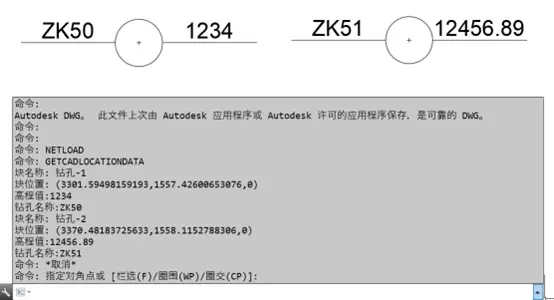
AutoCAD查询插件的开发

目前autoCAD软件使用的查询功能只是针对图元为字符串信息进行查找和定位,如果图元对象为直线,和曲线和块,如何查询和定位呢?

像直线,它的属性是起点,终点,线型,等信息。这些信息只是描述了它的作图方面的特征,这些特征没有体现出它的设计意图,所以不能以这些属性作为查询项,来定位和查找。

AT32F435模拟U盘操作W25Q128

  1
  2
  3
  4
  5
  6
  7
  8
  9
 10
 11
 12
 13
 14
 15
 16
 17
 18
 19
 20
 21
 22
 23
 24
 25
 26
 27
 28
 29
 30
 31
 32
 33
 34
 35
 36
 37
 38
 39
 40
 41
 42
 43
 44
 45
 46
 47
 48
 49
 50
 51
 52
 53
 54
 55
 56
 57
 58
 59
 60
 61
 62
 63
 64
 65
 66
 67
 68
 69
 70
 71
 72
 73
 74
 75
 76
 77
 78
 79
 80
 81
 82
 83
 84
 85
 86
 87
 88
 89
 90
 91
 92
 93
 94
 95
 96
 97
 98
 99
100
101
102
103
104
105
106
107
108
109
110
111
112
113
114
115
116
117
118
119
120
121
122
123
124
125
126
127
128
129
130
131
132
133
134
135
136
137
138
139
140
141
142
143
144
145
146
147
148
149
150
151
152
153
154
155
156
157
158
159
160
161
162
163
164
165
166
167
168
169
170
171
172
173
174
175
176
177
178
179
180
181
182
183
184
185
186
187
188
189
190
191
192
193
194
195
196
197
198
199
200
201
202
203
204
205
206
207
208
209
210
211
212
213
214
215
216
217
218
219
220
221
222
223
224
225
226
227
228
229
230
231
232
233
234
235
236
237
238
239
240
241
242
243
244
245
246
247
248
249
250
251
252
253
254
255
256
257
258
259
260
261
262
263
264
265
266
267
268
269
270
271
272
273
274
275
276
277
278
279
280
281
282
283
284
285
286
287
288
289
290
291
292
293
294
295
296
297
298
299
300
301
302
303
304
305
306
307
308
309
310
311
312
313
314
315
316
317
318
319
320
321
322
323
324
325
326
327
328
329
330
331
332
333
334
335
336
337
338
339
340
341
342
343
344
345
346
347
348
349
350
351
352
/*
 * usbfs/ufs.cpp - part of UniClock, a Clock for the Galactic Unicorn.
 *
 * UniClock is an enhanced clock/calendar display for the beautiful Galactic
 * Unicorn.
 *
 * usbfs is the subsystem that handles presenting a filesystem to the host
 * over USB; in this instance, it is used for managing configuration files.
 *
 * ufs is the actual filesystem management, which sits on top of the USB and
 * storage components.
 * 
 * Copyright (C) 2023 Pete Favelle <ahnlak@ahnlak.com>
 * Released under the MIT License; see LICENSE for details.
 */

/* System headers. */

#include <stdio.h>
#include <stdlib.h>

#include "stdlib.h"

/* Local headers. */
#include "flash_diskio.h"
#include "spi_flash.h"
#include "w25qxx.h"  /* SPI Flash driver file */

#include "ff.h"
#include "diskio.h"
#include "ufs.h"
extern const Diskio_drvTypeDef Flash_Driver;

/* Disk status */
static volatile DSTATUS Stat = STA_NOINIT;
/* Module variables. */
static char USERPath[4];   /* SD logical drive path */
static FATFS USERFatFS;

#define _MIN_SS FF_MIN_SS
#define _MAX_SS FF_MAX_SS

/* Functions */
// 配置文件系统
void format_disk() {
    FATFS fs;
		MKFS_PARM opt = {
				.fmt = FM_FAT32,  // **改成 FAT16**
				.n_fat = 1,       
				.align = 0,    
				.n_root = 0,    
				.au_size = 512
		};
    BYTE work[4096];       // 工作缓冲区

    // 簇数量计算(示例)
    DWORD n_clst = (16 * 1024 * 1024) / opt.au_size; // 16MB存储大小

    // 格式化磁盘
    FRESULT res = f_mkfs("", &opt, work, sizeof(work));
    if (res == FR_OK) {
        printf("Disk formatted successfully.\n");
    } else {
        printf("Failed to format disk. Error code: %d\n", res);
    }

    // 装载文件系统
    res = f_mount(&fs, "", 1);
    if (res == FR_OK) {
        printf("File system mounted successfully.\n");
    } else {
        printf("Failed to mount file system. Error code: %d\n", res);
    }
}
void ufs_init(void) {
    FRESULT res;
    // 注册并链接Flash驱动
    FATFS_LinkDriver(&Flash_Driver, USERPath);
}

// Define workspace buffer for formatting
BYTE workBuffer[4 * User_Sector];

/* Mount the FatFs filesystem */
void Mount_FatFs(void) {
	  //format_disk();
    // Mount the filesystem
    FRESULT retUSER = f_mount(&User_FatFs, User_SDPath, 1);
    // If an error occurs
    if (retUSER != FR_OK) {
        // If no filesystem exists, format it
        if (retUSER == FR_NO_FILESYSTEM) {
            printf("\nNo filesystem found, starting format\n");
            format_disk();
        }
        // If another error occurs
        else {
            printf("An error occurred, error code = %d\n", retUSER);
        }
    }
    // If the filesystem already exists, mount successfully
    else {
			  //format_disk();
        printf("Filesystem mounted successfully\n");
    }
}
void FatFs_GetDiskInfo(void) {
    FATFS *FS;
    size_t Total = 0, Used = 0, Free = 0;
    DWORD FreeClusters, TotalSectors;

    // Step 1: 获取磁盘信息
    int Ret = f_getfree("0:", &FreeClusters, &FS);
    if (Ret != FR_OK) {
        printf("Error: f_getfree() failed! Code: %d\n", Ret);
        return;
    }

    // Step 2: 通过 GET_SECTOR_COUNT 获取实际的总扇区数
    if (disk_ioctl(0, GET_SECTOR_COUNT, &TotalSectors) != RES_OK) {
        printf("Error: GET_SECTOR_COUNT failed!\n");
        return;
    }

    // Step 3: 确保 FS->ssize 有效
    if (FS->ssize == 0) {
        printf("Error: Sector size is 0!\n");
        return;
    }

    // Step 4: 计算 FAT 结构占用的空间 (估算)
    DWORD ReservedSectors = FS->csize * 32;  // 估算 FAT 表占用的空间
    size_t SystemUsed = ReservedSectors * FS->ssize;

    // Step 5: 计算存储大小
    size_t FreeSectors = FreeClusters * FS->csize;    // 空闲扇区数
    size_t UsedSectors = TotalSectors - FreeSectors;  // 已用扇区数

    Total = TotalSectors * FS->ssize;  // 总容量 (字节)
    Free = FreeSectors * FS->ssize;    // 空闲容量 (字节)
    Used = UsedSectors * FS->ssize;    // 已用容量 (字节)

    // Step 6: 转换为 KB / MB
    size_t Total_KB = Total / 1024;
    size_t Free_KB = Free / 1024;
    size_t Used_KB = Used / 1024;
    
    size_t Total_MB = Total_KB / 1024;
    size_t Free_MB = Free_KB / 1024;
    size_t Used_MB = Used_KB / 1024;

    // Step 7: 打印容量信息
    printf("\n=== FAT File System Info ===\n");
    printf("Total Space:  %lu B  (%lu KB, %lu MB)\n", Total, Total_KB, Total_MB);
    printf("Used Space:   %lu B  (%lu KB, %lu MB)\n", Used, Used_KB, Used_MB);
    printf("Free Space:   %lu B  (%lu KB, %lu MB)\n", Free, Free_KB, Free_MB);
    printf("System Used (FAT Table + Root Dir): %lu B\n", SystemUsed);
}

/* 写入 TXT 文件 */
void FatFs_WriteTXTFile(TCHAR *filename) {
    FIL file;
    FATFS *fs;
    FRESULT res;

    printf("\n*** Creating TXT file: %s ***\n", filename);

    // Step 1: 检查是否已经挂载
    f_getfree("0:", NULL, &fs);
    if (fs == NULL) {  // 如果未挂载,执行挂载
        static FATFS fatfs;
        res = f_mount(&fatfs, "0:", 1);
        if (res != FR_OK) {
            printf("Error: f_mount() failed! Code: %d\n", res);
            return;
        }
    }

    // Step 2: 打开/创建文件
    res = f_open(&file, filename, FA_CREATE_ALWAYS | FA_WRITE);
    if (res != FR_OK) {
        printf("Open file error, error code: %d\n", res);
        return;
    }

    // Step 3: 写入内容
    TCHAR str[] = "Line1: Hello, FatFs with fixed date (2025/02/06)\n";  
    UINT bw;
    res = f_write(&file, str, sizeof(str) - 1, &bw);
    if (res == FR_OK) {
        printf("Write file successful: %s (%d bytes written)\n", filename, bw);
    } else {
        printf("Write file failed, error code: %d\n", res);
    }

    // Step 4: 关闭文件
    f_close(&file);
}
/* 判断文件是否存在 */
int FatFs_FileExists(const TCHAR *filename) {
    FILINFO fno;
    FRESULT res = f_stat(filename, &fno);
    
    if (res == FR_OK) {
        return 1;  // 文件存在
    } else if (res == FR_NO_FILE) {
        return 0;  // 文件不存在
    } else {
        return -1; // 发生错误
    }
}

/*读取一个文本文件的内容*/
void FatFs_ReadTXTFile(TCHAR *filename)
{
	printf("\r\n*** Reading TXT file: %s ***\r\n", filename);

	FIL	file;
	//以只读方式打开文件
	FRESULT res = f_open(&file, filename, FA_READ);  
	//打开成功
	if(res == FR_OK)
	{
		//读取缓存
		TCHAR str[100];
		//没有读到文件内容末尾
		while(!f_eof(&file))
		{
			//读取1个字符串,自动加上结束符”\0”
			//f_gets(str,100, &file);	
			//printf("%s", str);
		}
		printf("\r\n");
	}
	//如果没有该文件
	else if(res == FR_NO_FILE)
		printf("File does not exist\r\n");
	//打开失败
	else
		printf("f_open() error,error code: %d\r\n", res);
	//关闭文件
	f_close(&file);
}
#include "ff.h"
#include <stdio.h>

/* 扫描和显示指定目录下的文件和目录 */
void FatFs_ScanDir(const TCHAR* PathName)
{
    FATFS fs;    // FAT 文件系统对象
    DIR dir;     // 目录对象
    FILINFO fno; // 文件信息
		FRESULT res;
//    // Step 1: 先挂载文件系统
//    FRESULT res = f_mount(&fs, "0:", 1);
//    if (res != FR_OK) {
//        printf("Error: f_mount() failed! Code: %d\n", res);
//        return;
//    }

    // Step 2: 打开目录
    res = f_opendir(&dir, PathName);
    if (res != FR_OK) {
        printf("Error: f_opendir() failed! Code: %d\n", res);
        f_mount(NULL, "0:", 0); // 卸载文件系统(可选)
        return;
    }

    printf("\n*** All entries in dir: %s ***\n", PathName);

    // Step 3: 读取目录中的文件
    while (1)
    {
        res = f_readdir(&dir, &fno);
        if (res != FR_OK || fno.fname[0] == 0) {
            break;  // 读取错误或到达目录末尾
        }

        // Step 4: 判断是文件还是目录
        if (fno.fattrib & AM_DIR) {
            printf("[DIR]  %s\n", fno.fname);
        } else {
            printf("[FILE] %s (%lu bytes)\n", fno.fname, fno.fsize);
        }
    }

    // Step 5: 关闭目录
    f_closedir(&dir);
   

    // Step 6: 卸载文件系统(可选)
    //f_mount(NULL, "0:", 0);
}

/*获取一个文件的文件信息*/
void FatFs_GetFileInfo(TCHAR *filename)
{
	printf("\r\n*** File info of: %s ***\r\n", filename);

	FILINFO fno;
	//检查文件或子目录是否存在
	FRESULT fr = f_stat(filename, &fno);
	//如果存在从fno中读取文件信息
	if(fr == FR_OK)
	{
		printf("File size(bytes) = %ld\r\n", fno.fsize);
		printf("File attribute = 0x%x\r\n", fno.fattrib);
		printf("File Name = %s\r\n", fno.fname);
		//输出创建/修改文件时的时间戳
		FatFs_PrintfFileDate(fno.fdate, fno.ftime);
	}
	//如果没有该文件
	else if (fr == FR_NO_FILE)
		printf("File does not exist\r\n");
	//发生其他错误
	else
		printf("f_stat() error,error code: %d\r\n", fr);
}

/*删除文件*/
void FatFs_DeleteFile(TCHAR *filename)
{
	printf("\r\n*** Delete File: %s ***\r\n", filename);
	FIL	file;
	//打开文件
	FRESULT res = f_open(&file, filename, FA_OPEN_EXISTING);  
	if(res == FR_OK)
	{
		//关闭文件
		f_close(&file);
		printf("open successfully!\r\n");
	}
	//删除文件
	res = f_unlink(filename);
	//删除成功
	if(res == FR_OK)
	{
		printf("The file was deleted successfully!\r\n");
	}
	//删除失败
	else
	{
		printf("File deletion failed, error code:%d\r\n", res);
	}
}

/*打印输出文件日期*/
void FatFs_PrintfFileDate(WORD date, WORD time)
{
	printf("File data = %d/%d/%d\r\n", ((date>>9)&0x7F)+1980, (date>>5)&0xF, date&0x1F);
	printf("File time = %d:%d:%d\r\n", (time>>11)&0x1F, (time>>5)&0x3F, time&0x1F);
}

使用Rust开发操作系统(UEFI基本介绍)

UEFI启动过程

UEFI背景介绍

UEFI(Unified Extensible Firmware Interface,统一可扩展固件接口)是一种现代化的固件接口标准,用于替代传统的BIOS(Basic Input/Output System)。UEFI提供了更强大的功能和灵活性,支持更大的硬盘、更快的启动速度以及更安全的启动过程。与BIOS相比,UEFI具有以下优势:

DOS下的一些编程语言

Qbasic 7.1 2.29M Microsoft出的很著名也很经典的QBasic版本的最高版本,全图形环境.对于初学编程或想编写简单程序的人来说很实用,而要想编写更强大的软件可以使用下面更强大的编程工具.